
I had a chance to work with this NoSQL timeseries database. So, I thought of sharing a simple framework. Use Lambda to ingest data from S3 into an AWS TimeStream, then remotely run queries from your local Pycharm.
Architecture Diagram:
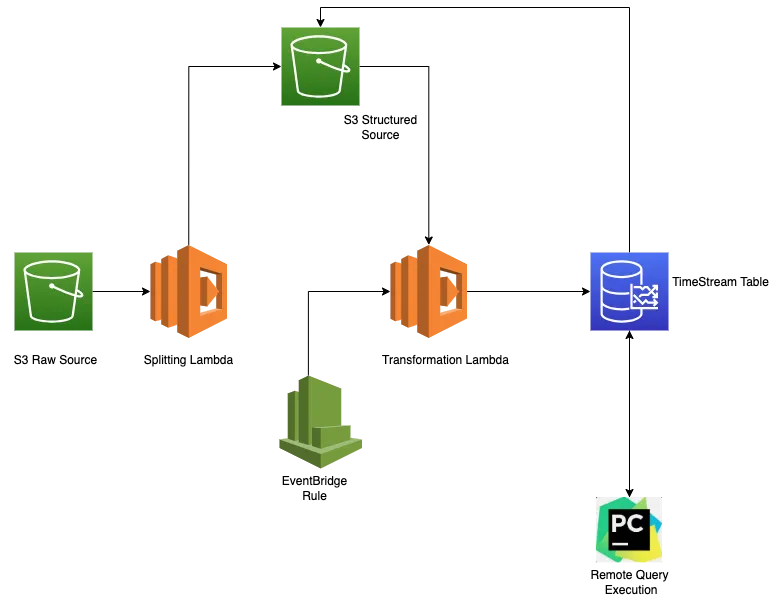
What’s happening on the architecture diagram:
This is the more elaborated version of how to ingest both real-time and batch data concurrently using a single Lambda.
Let’s first examine the tech stack, which consist of:
- AWS S3
- AWS Lambda
- AWS CloudWatch
- AWS TimeStream
- Pycharm
We will now unload the source CSV data into the S3 Raw Source bucket. That will trigger the splitting lambda. In the Lambda Console, we can set the trigger to a specific S3 bucket using EventBridge.
Purpose of Splitter Lambda:
Assume that when it comes to batch data, the file size can vary from MB to GB. The Lambda’s total memory is 10240 MB, and during the transformation and ingestion, it can only safely process files up to 200 MB in size. As a result, this lambda will break large files into chunks of processable files based on the user-provided size.
For instance, the lambda specifies a size limit of 200 MB. If the file size surpasses this limit, the file chunks it and loads it into the S3 Structured Source. If not, it loads the original file into the S3 Structured Source Bucket, using date partitioning to create folders.
Below is the Python script that splits large files into chunks based on the provided size.
import boto3 import json import os import csv import io import datetime import re import awswrangler as wr import numpy as np s3 = boto3.client('s3') def lambda_handler(event, context): ## Attributes extraction from parameters # Destination Bucket name dest_bucket = os.environ['bucket_name'] ## Extraction of Source Path event_result = event['Records'] bucket_name = ''.join([sub['s3']['bucket']['name'] for sub in event_result]) object_name = ''.join([sub['s3']['object']['key'] for sub in event_result]) path = "s3://" + bucket_name + "/" + object_name ## Gets the required file size_reader = s3.get_object(Bucket=bucket_name, Key=object_name) ## Providing the required size to chunk chunk_size = 200 * 1024 * 1024 ## Reading data from Source df = wr.s3.read_csv(path) ## partition for upload split DataFrame to S3 today = datetime.datetime.now() datim = today.strftime("%Y%m%dT%H%M%S") year = today.strftime("%Y") month = today.strftime("%m") day = today.strftime("%d") ## Getting the size value of the file file_size = size_reader['ContentLength'] if file_size > chunk_size: ## Logic for splitting the actual size value into chunks based on chunk_size variable num_chunks = file_size // chunk_size + 1 ## Using numpy's array_split function the dataframe is splitted into chunks of df's chunks = np.array_split(df, num_chunks) ## The chunked datframes is uploaded to S3 under the loop for i, chunk in enumerate(chunks): chunk_data = chunk.to_csv(index=False) output = "raw_source/" + year + "/" + month + "/" + day + "/" + desired_name + "/" + "part" + str(i + 1) + "-" + desired_name + ".csv" s3.put_object(Body=chunk_data, Bucket=dest_bucket, Key=output) else: ## When the file size is smaller than the desired value whole file is uploaded to S3 s3_c = boto3.resource('s3') copy_source = { 'Bucket': bucket_name, 'Key': object_name } output = "raw_source/" + year + "/" + month + "/" + day + "/" + desired_name + "/" + desired_name + ".csv" # print(output) s3_c.meta.client.copy(copy_source, dest_bucket, output) # TODO implement return { 'statusCode': 200 }
The Transformation Lambda will activate after loading the chunked files or the small-sized original file into the S3 Structured Source.
Purpose of Transformation Lambda:
The primary objective of this lambda is to process both real-time and batch data in accordance with the trigger types.
This lambda is triggered every time a file is loaded into S3 Structured Source, and then the developed real-time and batch logics are used based on the file size.
(Note: According to the scenario in which I worked, the real-time data was less than 1 MB and the batch data size was between 50 and 200 MB.)
For instance, the real-time logic will execute if the file size is less than 1 MB, and the batch logic will run if the file size is greater than that.
What does real-time logic do?
We apply the for-loop concept to the transformations and mapping process, appending the transformed data into a list. We then use the Boto3 write_record function to ingest that list into the AWS TimeStream.
response = client.write_records(DatabaseName=DB_NAME, TableName=TBL_NAME, Records=record) What does Batch Logic do?
We apply the same For-loop concept to the transformation and mapping process, append it to a list, and store it in a subfolder under the S3 Structured Source bucket.
Now, an in-built function known as Batch Load Task is available for ingesting bulk data into an AWS TimeStream. This will assist in inserting GBs of data from S3 into TimeStream in a single run.
For example, once all the batch loads are completed for the day and all the transformed data is stored under a sub-folder in the S3 Structured Source bucket, a cron job under the AWS CloudWatch Rule is scheduled to trigger the same lambda by the end of the day to run the create_batch_load_task function, which will create a Batch Load Task in the AWS TimeStream that’ll ingest all the data from the pointed source (AWS S3) to the required Destination TimeStream Table.
The following is a template for creating a Batch Load Task using the Python SDK:
response = client.create_batch_load_task(TargetDatabaseName=DB_NAME, TargetTableName=TBL_NAME, DataModelConfiguration={ 'DataModel': { "TimeColumn": "Timestamp", "TimeUnit": "MILLISECONDS", "DimensionMappings": [{ "SourceColumn": "Dimension_Columnname_from_S3", "DestinationColumn": "Dimension_Columnname_to_TimeStream" } ], "MultiMeasureMappings": { "MultiMeasureAttributeMappings": [ { "SourceColumn": "MeasureValue_Column_from_S3", "TargetMultiMeasureAttributeName": "MeasureValue_Column_to_TimeStream", "MeasureValueType": "DOUBLE" }, { "SourceColumn": "source_time_from_S3", "TargetMultiMeasureAttributeName": "source_time_to_TimeStream", "MeasureValueType": "TIMESTAMP" } ] }, "MeasureNameColumn": "measure_name" } }, DataSourceConfiguration={ "DataSourceS3Configuration": { "BucketName": 'bucket_name', "ObjectKeyPrefix": output }, "DataFormat": "CSV" }, ReportConfiguration={ "ReportS3Configuration": { "BucketName": 'bucket_name', "ObjectKeyPrefix": 'sub_folder', "EncryptionOption": 'SSE_S3' } } ) print(response)
The complete Python script that can handle both real-time and batch data simultaneously based on S3 and CloudWatch Rule triggers is below:
import boto3 import json import awswrangler as wr import os import csv import io import random import string def lambda_handler(event, context): ## Capture Transformation Start time from datetime import datetime time_var = datetime.now() cur = time_var.strftime("%d/%m/%Y %H:%M:%S") print("Process started at", cur) ## Attributes extraction from parameters # TimeStream Details DB_NAME = os.environ['DB_NAME'] TBL_NAME = os.environ['TBL_NAME'] ## Reading data from Source client = boto3.client('timestream-write') ## Identify the lambda purpose try: event_trigger = event['Records'][0]['eventSource'] except: event_trigger = event['source'] if event_trigger == 'aws:s3': print("Entering record transformation and mapping Process") ## Extraction of Source Path event_result = event['Records'] print(event_result) bucket_name = ''.join([sub['s3']['bucket']['name'] for sub in event_result]) object_name = ''.join([sub['s3']['object']['key'] for sub in event_result]) path = "s3://" + bucket_name + "/" + object_name ## Gets the required file size_reader = s3.get_object(Bucket=bucket_name, Key=object_name) ## Providing the required size to chunk desired_size = 10 * 1024 * 1024 ## Getting the size value of the file file_size = size_reader['ContentLength'] df = wr.s3.read_csv(path) ## Records conversion from csv to dictionary json_df = df.to_json(orient="records") source = json.loads(json_df) ## Extraction, transformation and mapping of data from the source import datetime from time import time record = [] for i in range(0, len(source)): Product_list = {key.strip(): value for key, value in source[i].items()} #---Time transformation from String to MilliSeconds for source data---# time_val = Product_list['Timestamp'] timestamp_epoch = datetime.datetime.strptime(time_val, "%m/%d/%Y %H:%M:%S") timestamp_millisecond = timestamp_epoch.timestamp() * 1000 millisecond_varchar = str(timestamp_millisecond) valid_time = millisecond_varchar.replace(".0", "") #---Current Time transformation from String to MilliSeconds for source data---# milliseconds = int(time() * 1000) # print(milliseconds) if file_size < desired_size: ## Process to read and write the source data for near-real_time use-case. key_list = list(Product_list.keys()) dims = key_list[1] block = dims[:2] measure_name = str(block) time_column = { 'Name': 'source_time', 'Value': str(valid_time), 'Type': 'TIMESTAMP' } temp_val = { 'Name': 'measure_value', 'Value': str(Product_list[sens]), 'Type': 'DOUBLE' } dimension = [{'Name': 'DimensionName', 'Value': dims}] overall_value = {'Time': str(milliseconds), 'Dimensions': dimension, 'MeasureName': measure_name, 'MeasureValues': [time_column, temp_val], 'MeasureValueType': 'MULTI'} record = [overall_value] print(record) try: response = client.write_records(DatabaseName=DB_NAME, TableName=TBL_NAME, Records=record) print("WriteRecords Status: [%s]" % response['ResponseMetadata']['HTTPStatusCode']) except client.exceptions.RejectedRecordsException as err: print("RejectedRecords: ", err) for rr in err.response["RejectedRecords"]: print("Rejected Index " + str(rr["RecordIndex"]) + ": " + rr["Reason"]) print("Other records were written successfully. ") except Exception as err: print("Error:", err) if file_size > desired_size: key_list = list(Product_list.keys()) dims = key_list[1] overall_value = {'DimensionName ': dims, 'Timestamp': str(milliseconds), 'measure_value': str(Product_list[sens]), 'source_time': valid_time, 'measure_name': measure_name} record.append(overall_value) if file_size >desired_size: ## Curation Folder Partition Process for transformed values to be inserted, since batch_load_task only accepts files like csv, json etc... today = datetime.datetime.now() datim = today.strftime("%Y%m%dT%H%M%S") year = today.strftime("%Y") month = today.strftime("%m") day = today.strftime("%d") output = "curated_source/" + year + "/" + month + "/" + day + "/" + dims + "/" + dims + "-" + datim + ".csv" stream = io.StringIO() headers = list(record[0].keys()) writer = csv.DictWriter(stream, fieldnames=headers) writer.writeheader() writer.writerows(record) csv_string_object = stream.getvalue() s3 = boto3.resource('s3') s3.Object('bucket_name', output).put(Body=csv_string_object) if event_trigger == 'aws.events': print("Entering record uploading to TimeStream Process") # Process to read and write the source data using batch_load_task function for batch load use-case. today = datetime.datetime.now() datim = today.strftime("%Y%m%dT%H%M%S") year = today.strftime("%Y") month = today.strftime("%m") day = today.strftime("%d") output = "curated_source/" + year + "/" + month + "/" + day + "/" response = client.create_batch_load_task(TargetDatabaseName=DB_NAME, TargetTableName=TBL_NAME, DataModelConfiguration={ 'DataModel': { "TimeColumn": "Timestamp", "TimeUnit": "MILLISECONDS", "DimensionMappings": [{ "SourceColumn": "Dimension_Columnname_from_S3", "DestinationColumn": "Dimension_Columnname_to_TimeStream" } ], "MultiMeasureMappings": { "MultiMeasureAttributeMappings": [ { "SourceColumn": "MeasureValue_Column_from_S3", "TargetMultiMeasureAttributeName": "MeasureValue_Column_to_TimeStream", "MeasureValueType": "DOUBLE" }, { "SourceColumn": "source_time_from_S3", "TargetMultiMeasureAttributeName": "source_time_to_TimeStream", "MeasureValueType": "TIMESTAMP" } ] }, "MeasureNameColumn": "measure_name" } }, DataSourceConfiguration={ "DataSourceS3Configuration": { "BucketName": 'bucket_name', "ObjectKeyPrefix": output }, "DataFormat": "CSV" }, ReportConfiguration={ "ReportS3Configuration": { "BucketName": 'bucket_name', "ObjectKeyPrefix": 'sub_folder', "EncryptionOption": 'SSE_S3' } } ) print(response) ## Capture Transformation End time from datetime import datetime var_time = datetime.now() cur_end = var_time.strftime("%d/%m/%Y %H:%M:%S") print("Process ended at", cur_end) # TODO implement return { 'statusCode': 200, # 'body': json.dumps('Hello from Lambda!') }
Interacting with the AWS TimeStream from Pycharm:
First, integrate the AWS environment with Pycharm to run queries on the TimeStream table. Get the AWS Access_Key_ID and Secret_Access_Key, and if it’s an organization account, get the Session_Token as well.
Download the AWS Tool Kit in PyCharm, install AWS Configure locally, and then open Terminal on a Mac or open cmd on a Windows.
#Use the Following Command to configure the AWS Credentials in it. #In Mac: naveenchandarb@cmd ~ % vi ~/.aws/credentials [default] Access_Key_ID = ************************ Secret_Access_Key = ************************ Session_Token = ************************ #In Windows: naveenchandarb@cmd ~ % aws configure Access_Key_ID = ************************ Secret_Access_Key = ************************ Session_Token = ************************ region = ************************
After configuring AWS credentials on the local machine, go to PyCharm, create a Python file, and use the below script to interact with the AWS TimeStream.
import boto3 timestream_client = boto3.client('timestream-query') paginator = self.timestream_client.get_paginator('query') def execute_query(query): response = paginator.paginate(QueryString=query) # print(response) column_names = [column['Name'] for column in response['ColumnInfo']] query_id = response['QueryId'] next_token = None rows = [] while True: if 'Rows' in response: rows.extend(response['Rows']) if 'NextToken' in response: next_token = response['NextToken'] response = timestream_client.query(QueryString=query_id, NextToken=next_token) else: break return rows, column_names def parse_rows(rows): parsed_rows = [] for row in rows: parsed_row = [] for data in row['Data']: parsed_row.append(data.get('ScalarValue')) parsed_rows.append(parsed_row) return parsed_rows def run_query(query): rows, column_names = execute_query(query) parsed_rows = parse_rows(rows) return parsed_rows, column_names query = """ unload( SELECT Dimension_Name, AVG(measure_value) AS avg_value, bin(time, 15m) as avg_time FROM "timestream_db"."timestream_table" WHERE time >= '2018-01-01 00:00:00' AND time <= '2018-01-10 00:00:00' and measure_name = 'Medium' group by Dimension_Name, bin(time, 15m)) to S3://bucket_name/sub_folders/ with (format = 'CSV', compression = 'NONE') """ result, column_names = run_query(query) table = [column_names] + result # Print the result for row in table: print(row)
I hope this blog will help in performing TimeStream operations using Lambda without any complex coding to achieve remote query executions and the ingestion of both real-time and batch-load data using the Python SDK.