
Introduction
Kafka is a powerful tool for building real-time streaming data pipelines and applications. Establishing Kafka locally can significantly boost productivity by streamlining testing and debugging.
This blog will walk you through setting up Kafka locally using Docker and consuming it with Python.
Kafka
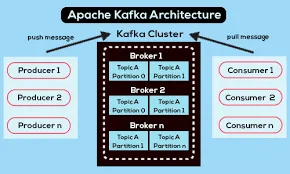
Apache Kafka is an open-source distributed event streaming platform originally developed by LinkedIn and later open-sourced as part of the Apache Software Foundation. Its design ensures efficient, reliable, and fault-tolerant handling of large volumes of real-time data.
Docker
Docker is a platform and a set of tools designed to simplify the process of creating, deploying, and managing applications using containers. Containers are lightweight, standalone, executable packages that contain everything needed to run a piece of software, including code, runtime, system tools, libraries, and settings.
Installing Kafka using Docker
- The prerequisite for the process is that we have Docker installed on our local system; if not, you can download Docker from the official website below.
https://docs.docker.com/engine/install/
- Once the installation is complete, you can confirm by running the following command at the command prompt:
docker --version- We’ll utilize the confluent platform to configure Docker images and environment variables.
- Obtain or clone the repository from the following Git repository to your local machine.
https://github.com/confluentinc/cp-all-in-one/tree/7.6.0-post%C2%A0.File Structure:
Once cloned, you’ll notice the following structure:
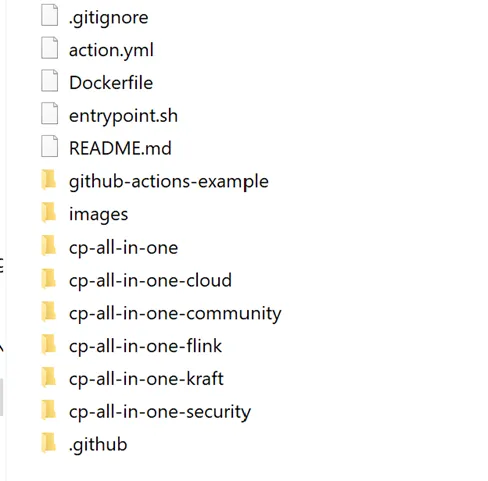
- cp-all-in-one: Confluent Enterprise License version of Confluent Platform.
- cp-all-in-one-flink: Confluent Enterprise License version with Flink integration.
- cp-all-in-one-community: Confluent Community License version.
- cp-all-in-one-cloud: Docker Compose files for Confluent Cloud.
- cp-all-in-one-kraft: Confluent Enterprise License version using KRaft.
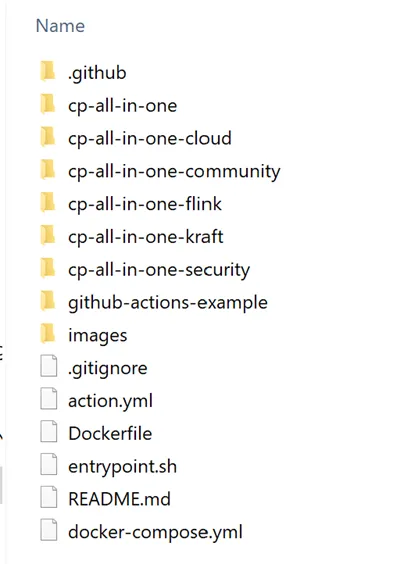
docker-compose.yml:
Create a new file named docker-compose.yml and insert the provided code snippet containing configurations for Zookeeper, Kafka, Schema Registry, Kafka Connect, Control Center, ksqlDB, and other components.
--- version: '2' services: zookeeper: image: confluentinc/cp-zookeeper:7.6.0 hostname: zookeeper container_name: zookeeper ports: - "2181:2181" environment: ZOOKEEPER_CLIENT_PORT: 2181 ZOOKEEPER_TICK_TIME: 2000 broker: image: confluentinc/cp-server:7.6.0 hostname: broker container_name: broker depends_on: - zookeeper ports: - "9092:9092" - "9101:9101" environment: KAFKA_BROKER_ID: 1 KAFKA_ZOOKEEPER_CONNECT: 'zookeeper:2181' KAFKA_LISTENER_SECURITY_PROTOCOL_MAP: PLAINTEXT:PLAINTEXT,PLAINTEXT_HOST:PLAINTEXT KAFKA_ADVERTISED_LISTENERS: PLAINTEXT://broker:29092,PLAINTEXT_HOST://localhost:9092 KAFKA_METRIC_REPORTERS: io.confluent.metrics.reporter.ConfluentMetricsReporter KAFKA_OFFSETS_TOPIC_REPLICATION_FACTOR: 1 KAFKA_GROUP_INITIAL_REBALANCE_DELAY_MS: 0 KAFKA_CONFLUENT_LICENSE_TOPIC_REPLICATION_FACTOR: 1 KAFKA_CONFLUENT_BALANCER_TOPIC_REPLICATION_FACTOR: 1 KAFKA_TRANSACTION_STATE_LOG_MIN_ISR: 1 KAFKA_TRANSACTION_STATE_LOG_REPLICATION_FACTOR: 1 KAFKA_JMX_PORT: 9101 KAFKA_JMX_HOSTNAME: localhost KAFKA_CONFLUENT_SCHEMA_REGISTRY_URL: http://schema-registry:8081 CONFLUENT_METRICS_REPORTER_BOOTSTRAP_SERVERS: broker:29092 CONFLUENT_METRICS_REPORTER_TOPIC_REPLICAS: 1 CONFLUENT_METRICS_ENABLE: 'true' CONFLUENT_SUPPORT_CUSTOMER_ID: 'anonymous' schema-registry: image: confluentinc/cp-schema-registry:7.6.0 hostname: schema-registry container_name: schema-registry depends_on: - broker ports: - "8081:8081" environment: SCHEMA_REGISTRY_HOST_NAME: schema-registry SCHEMA_REGISTRY_KAFKASTORE_BOOTSTRAP_SERVERS: 'broker:29092' SCHEMA_REGISTRY_LISTENERS: http://0.0.0.0:8081 connect: image: cnfldemos/cp-server-connect-datagen:0.6.4-7.6.0 hostname: connect container_name: connect depends_on: - broker - schema-registry ports: - "8083:8083" environment: CONNECT_BOOTSTRAP_SERVERS: 'broker:29092' CONNECT_REST_ADVERTISED_HOST_NAME: connect CONNECT_GROUP_ID: compose-connect-group CONNECT_CONFIG_STORAGE_TOPIC: docker-connect-configs CONNECT_CONFIG_STORAGE_REPLICATION_FACTOR: 1 CONNECT_OFFSET_FLUSH_INTERVAL_MS: 10000 CONNECT_OFFSET_STORAGE_TOPIC: docker-connect-offsets CONNECT_OFFSET_STORAGE_REPLICATION_FACTOR: 1 CONNECT_STATUS_STORAGE_TOPIC: docker-connect-status CONNECT_STATUS_STORAGE_REPLICATION_FACTOR: 1 CONNECT_KEY_CONVERTER: org.apache.kafka.connect.storage.StringConverter CONNECT_VALUE_CONVERTER: io.confluent.connect.avro.AvroConverter CONNECT_VALUE_CONVERTER_SCHEMA_REGISTRY_URL: http://schema-registry:8081 # CLASSPATH required due to CC-2422 CLASSPATH: /usr/share/java/monitoring-interceptors/monitoring-interceptors-7.6.0.jar CONNECT_PRODUCER_INTERCEPTOR_CLASSES: "io.confluent.monitoring.clients.interceptor.MonitoringProducerInterceptor" CONNECT_CONSUMER_INTERCEPTOR_CLASSES: "io.confluent.monitoring.clients.interceptor.MonitoringConsumerInterceptor" CONNECT_PLUGIN_PATH: "/usr/share/java,/usr/share/confluent-hub-components" CONNECT_LOG4J_LOGGERS: org.apache.zookeeper=ERROR,org.I0Itec.zkclient=ERROR,org.reflections=ERROR control-center: image: confluentinc/cp-enterprise-control-center:7.6.0 hostname: control-center container_name: control-center depends_on: - broker - schema-registry - connect - ksqldb-server ports: - "9021:9021" environment: CONTROL_CENTER_BOOTSTRAP_SERVERS: 'broker:29092' CONTROL_CENTER_CONNECT_CONNECT-DEFAULT_CLUSTER: 'connect:8083' CONTROL_CENTER_KSQL_KSQLDB1_URL: "http://ksqldb-server:8088" CONTROL_CENTER_KSQL_KSQLDB1_ADVERTISED_URL: "http://localhost:8088" CONTROL_CENTER_SCHEMA_REGISTRY_URL: "http://schema-registry:8081" CONTROL_CENTER_REPLICATION_FACTOR: 1 CONTROL_CENTER_INTERNAL_TOPICS_PARTITIONS: 1 CONTROL_CENTER_MONITORING_INTERCEPTOR_TOPIC_PARTITIONS: 1 CONFLUENT_METRICS_TOPIC_REPLICATION: 1 PORT: 9021 ksqldb-server: image: confluentinc/cp-ksqldb-server:7.6.0 hostname: ksqldb-server container_name: ksqldb-server depends_on: - broker - connect ports: - "8088:8088" environment: KSQL_CONFIG_DIR: "/etc/ksql" KSQL_BOOTSTRAP_SERVERS: "broker:29092" KSQL_HOST_NAME: ksqldb-server KSQL_LISTENERS: "http://0.0.0.0:8088" KSQL_CACHE_MAX_BYTES_BUFFERING: 0 KSQL_KSQL_SCHEMA_REGISTRY_URL: "http://schema-registry:8081" KSQL_PRODUCER_INTERCEPTOR_CLASSES: "io.confluent.monitoring.clients.interceptor.MonitoringProducerInterceptor" KSQL_CONSUMER_INTERCEPTOR_CLASSES: "io.confluent.monitoring.clients.interceptor.MonitoringConsumerInterceptor" KSQL_KSQL_CONNECT_URL: "http://connect:8083" KSQL_KSQL_LOGGING_PROCESSING_TOPIC_REPLICATION_FACTOR: 1 KSQL_KSQL_LOGGING_PROCESSING_TOPIC_AUTO_CREATE: 'true' KSQL_KSQL_LOGGING_PROCESSING_STREAM_AUTO_CREATE: 'true' ksqldb-cli: image: confluentinc/cp-ksqldb-cli:7.6.0 container_name: ksqldb-cli depends_on: - broker - connect - ksqldb-server entrypoint: /bin/sh tty: true ksql-datagen: image: confluentinc/ksqldb-examples:7.6.0 hostname: ksql-datagen container_name: ksql-datagen depends_on: - ksqldb-server - broker - schema-registry - connect command: "bash -c 'echo Waiting for Kafka to be ready... && \ cub kafka-ready -b broker:29092 1 40 && \ echo Waiting for Confluent Schema Registry to be ready... && \ cub sr-ready schema-registry 8081 40 && \ echo Waiting a few seconds for topic creation to finish... && \ sleep 11 && \ tail -f /dev/null'" environment: KSQL_CONFIG_DIR: "/etc/ksql" STREAMS_BOOTSTRAP_SERVERS: broker:29092 STREAMS_SCHEMA_REGISTRY_HOST: schema-registry STREAMS_SCHEMA_REGISTRY_PORT: 8081 rest-proxy: image: confluentinc/cp-kafka-rest:7.6.0 depends_on: - broker - schema-registry ports: - 8082:8082 hostname: rest-proxy container_name: rest-proxy environment: KAFKA_REST_HOST_NAME: rest-proxy KAFKA_REST_BOOTSTRAP_SERVERS: 'broker:29092' KAFKA_REST_LISTENERS: "http://0.0.0.0:8082" KAFKA_REST_SCHEMA_REGISTRY_URL: 'http://schema-registry:8081'
Running Docker Image:
Navigate to the designated folder on the command prompt.

To execute the Docker image, use the below command.
docker-compose up -d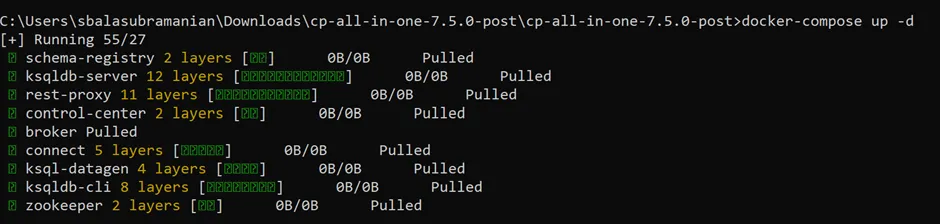
Confirm that the services are operational and running.
docker-compose ps 
Access Portal:
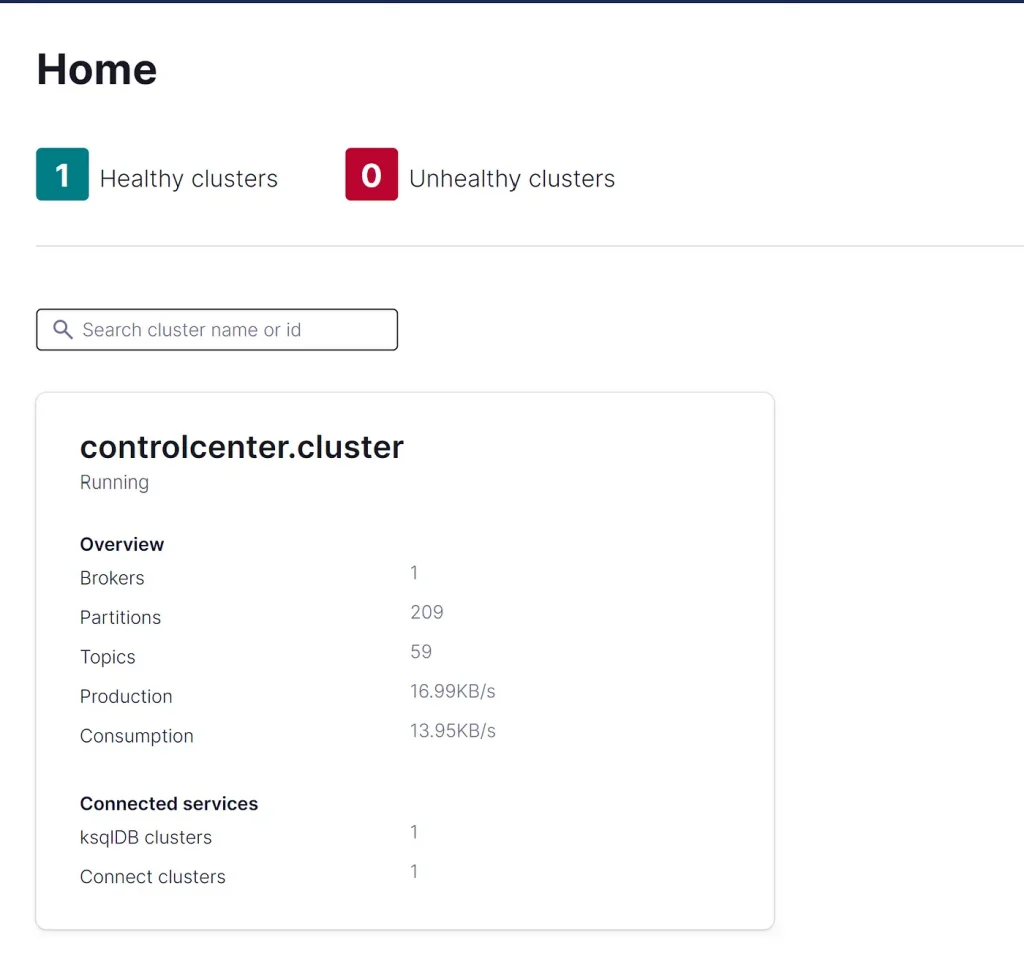
- To access the portal, navigate to the given site (e.g., http://localhost:9021/clusters) and click on the desired cluster.
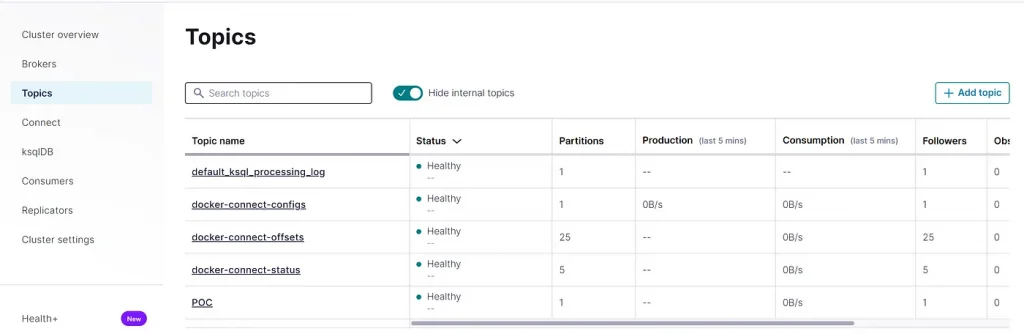
- Choose Topic from the menu, and then click Add Topic to create a new one.
Python Setup:
For the Python module, install the following packages:
pip install kafka-pythonCreate the message for the topic you created in the previous step, then begin sending it.
from kafka import KafkaProducer producer = KafkaProducer(bootstrap_servers=['localhost:9092']) future = producer.send('POC', key=b'VARTY', value=b'CHECK') record_metadata = future.get(timeout=10)To consume messages, you can use the following code:
from kafka import KafkaConsumer consumer=KafkaConsumer( 'POC', group_id='my-group', bootstrap_servers=['localhost:9092']) for message in consumer: print(message)Following these steps, you can set up Kafka locally using Docker and consume messages using Python.
Conclusion:
Establishing the Kafka system locally yields superior performance compared to cloud-based solutions due to reduced latency from data transfer within the local network, and it can function without reliance on internet connectivity. This setup is optimal for development and testing objectives. Developers can swiftly iterate on code modifications, simulate diverse scenarios, and troubleshoot issues without incurring expenses tied to cloud services.
References:
https://docs.confluent.io/
https://pypi.org/project/kafka-python/
https://kafka-python.readthedocs.io/en/master/install.html