
Is your analytics platform truly safe and ready to grow? In today’s data-driven world, deploying Power BI without governance is like building a city without traffic rules. Without guardrails, a BI deployment can quickly spiral into a tangled web of unmanaged datasets, sensitive data leaks, and uncontrolled sharing.
This post shows you how to avoid those pitfalls: it walks you through the key governance and security practices that make Power BI a safe, scalable, and reliable analytics platform. From defining clear roles and workspace-management policies to applying row-level security and monitoring usage—you’ll see how a robust governance framework helps protect data, ensure compliance, and maintain order even as adoption grows.
If you’re responsible for building, managing, or scaling a Power BI environment. This blog will cover the best practices to keep your analytics environment safe, compliant, and scalable.
Understanding Data Governance in Power BI
Governance in Power BI refers to the policies, processes, and controls that ensure the effective management of data within the platform. Proper governance helps organizations maximize the value of Power BI while minimizing risks such as data breaches, mismanagement, or compliance violations.
Challenges in creating a robust governance framework stem from both the people and the organizational structure.
- Access Management:Assigning roles and responsibilities for data management ensures that the right people have access to the right data. Data stewards play a crucial role in maintaining data quality and compliance.
- Content Lifecycle Management:Implementing controls around creating, publishing, and distributing reports and dashboards helps prevent the proliferation of outdated or inaccurate information. It also ensures that content is aligned with organizational objectives.
- Usage Monitoring:Regularly monitoring usage patterns within Power BI can help identify anomalies, enforce best practices, and optimize resource allocation. This includes tracking who accesses what data, when, and for what purpose.
Let’s dive into how Power BI addresses these challenges. Since there’s no universal data governance model, it is important to start with these essential principles to create a framework tailored to your organization.
Power BI Implementation Strategy
There are various models for delivering and controlling access to data and reporting. While most business intelligence (BI) projects exist on a spectrum, categorizing them can help clarify the underlying concepts.
- IT Managed BI Solution:A highly controlled, IT-driven approach where business users depend on reports generated and published by the IT department.
- Self-Service Approach:Here, data engineers ensure data is clean and prepared for analysis. BI developers set up semantic models, while business users create and manage reports using these models, translating their needs into actionable insight.
A key consideration across these implementation or delivery models is managing access and configuring the workspace, while also determining the appropriate administrative structure to ensure the data remains secure, accurate, and reliable.
Best Practices for Governance and Security in Power BI
Naming, Roles, and Permission
- Workspaces should have clear, concise, and descriptive names. This helps team members easily identify the content and purpose of the workspace.
- If you need to maintain multiple versions (e.g., for testing or different audiences), clearly label them (e.g., “Marketing_Analytics_Test” and “Marketing_Analytics_Prod”).
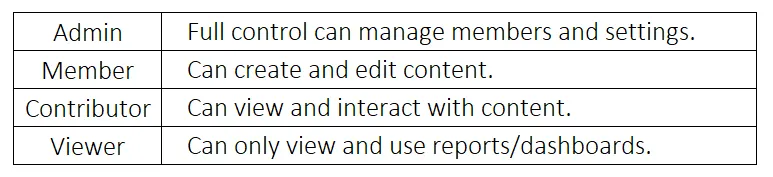
- Define clear roles,such as Admin, Member, Contributor, and Viewer. Assign roles based on responsibilities:
- Follow the principle of least privilege: Grant only the necessary level of access to avoid accidental changes or unauthorized access to sensitive data.
- Restrict admin rights; therefore, limit the number of admins in a workspace to reduce the risk of unintentional changes or exposure of sensitive data.
Access, Security, and Monitoring
- Group-based access: Instead of managing individual permissions, use Azure Active Directory (AAD) groups to manage user roles. This simplifies access management as team members change.
- Using Administrative Units in group-based management for Power BI workspaces is a robust approach for managing access and ensuring governance in large enterprise implementations. Admin Units, in combination with Azure Active Directory (AAD) groups, provide a scalable and secure way to control permissions and manage resources across different departments or business units.
- Monitor workspace activity by regularly monitoring workspace usage through Power BI Service Usage Metrics or use custom dashboards to track who is accessing data, when, and how.
Lifecycle and Archiving
- Enforce workspace lifecycle management by defining clear policies for moving content from development to production. Limit access to production workspaces to minimize risks.
- Limit workspace creation rights to specific users or groups to maintain control over report distribution. Ensure workspaces follow governance policies.
-
Periodically review and archive or delete unused or inactive workspaces. Securely store or delete archived workspaces based on data retention policies.
Report/Dataset Management and Collaboration
- Use certified or shared datasets for consistency across workspaces. This reduces duplication and ensures that everyone is working from the same data.
- Schedule refreshes appropriately based on business needs and avoid unnecessary frequency, which could put a load on the data source.
- Regularly monitor dataset sizes and query performance to ensure the workspace remains efficient.
- Make use of the built-in “comment” feature on the report to enhance collaboration and refine the content effectively.
- Designate trusted datasets as “certified” or “promoted” so that business users can rely on high-quality data sources. This avoids the proliferation of duplicate or inconsistent datasets across workspaces.
- Depending on the scenario, granting “viewer workspace” access would be appropriate for a specific team tasked with testing all reports in a workspace. Otherwise, “report audience” access can be assigned to individuals who only need access to specific reports.
Row-Level Security (RLS)
- Row-Level Security (RLS) in Power BI is a feature that allows you to restrict data access for certain users at the row level within datasets. This enables report creators to define rules that control which data a particular user or group of users can see when they interact with reports and dashboards.
-
Avoid relying solely on workspace permissions, even with proper role assignments. Use RLS to enforce per-user data restrictions within shared datasets.
Unified Data Governance with Fabrics & Microsoft Purview Integration
- Centralized Governance: Microsoft Fabric integrates seamlessly with Microsoft Purview, enabling organizations to have a centralized platform to manage data governance across all data sources. This helps enforce consistent governance policies from ingestion to reporting within Power BI.
- Data Discovery and Classification: Power BI users can now discover, classify, and manage data directly within Microsoft Purview. This allows for better governance over sensitive data and more streamlined compliance with regulations like GDPR or HIPAA.
- Automated Lineage Tracking: Fabric allows Power BI reports and datasets to be automatically tracked in terms of data lineage, showing how data flows from its source to final reports. This transparency improves governance and compliance, making it easier to identify and mitigate potential data risks.
- Data Retention and Archiving: Fabric supports improved data retention policies, enabling organizations to define how long data is retained in Power BI datasets and reports and when it is archived or deleted to comply with legal and regulatory requirements.
- Data Quality and Governance Automation: Power BI integrates better with data quality tools within Microsoft Fabric, ensuring that data governance is enforced at all stages, from raw data ingestion to final report creation.
- Automated Dataflow Management: Governance is improved through automated dataflow management, ensuring that data pipelines feeding into Power BI reports adhere to predefined data standards, security protocols, and governance policies.
- Compliance and Sensitivity Labels: Microsoft Fabric enhances Power BI’s ability to enforce compliance through data sensitivity labels. These labels are managed in Purview and integrated across the Fabric ecosystem. They ensure compliance policies apply automatically across datasets, reports, and dashboards.
Data Loss Prevention (DLP)—Strengthening Data Governance
Even with strong role-based access, workspace permissions, and row-level security, there remains a risk: sensitive data (PII, financial, health, proprietary IP, etc.) can be accidentally exposed—for example, through uncontrolled dataset sharing, report downloads, or exporting. DLP (Data Loss Prevention) closes that gap by adding content-level controls to your governance framework.
With Microsoft Purview, you can define DLP policies that apply to your Power BI (or broader Microsoft Fabric) environment. Once configured, these policies automatically scan semantic models or datasets for sensitive information. Depending on settings, they trigger alerts, show policy tips, or block risky actions.
Key capabilities of Purview-based DLP:
- Detect sensitive data by classification using sensitivity labels like “Confidential” or “PII.” Alternatively, detect data by content patterns such as credit card numbers and health info.
-
Issue real-time policy tips to data owners or users when you find sensitive content. This helps raise awareness and guide proper handling.
-
Generate alerts for compliance/security admins, enabling monitoring and investigation of potential data leaks.
-
Prevent sharing, downloading, or publishing of risky datasets—especially useful for regulated or high-sensitivity workloads (finance, health, IP, etc.).
Why DLP fits into a layered governance model
Role-based access controls and workspace security determine who can access data. DLP defines what data users can store, share, or publish. This content-centric protection ensures that even authorized users don’t inadvertently leak sensitive information. In combination, the layers deliver a more robust, compliance-ready, and scalable security posture across your analytics platform.
Leverage Microsoft Information Protection (MIP): Apply sensitivity labels (e.g., Confidential, Highly Confidential, General) to Power BI reports, datasets, and dashboards to classify the sensitivity level of the data.
Prevent unauthorized sharing: Sensitivity labels can help prevent unauthorized users from exporting data or sharing reports outside the organization. You can configure labels to restrict actions like exporting to Excel or copying data.
Conclusion
As organizations adopt Microsoft Fabric and expand their Power BI footprint, governance and security become even more critical. A comprehensive governance framework is supported by Purview integration, RLS, lifecycle management, and DLP. It ensures analytics remain secure, compliant, and scalable.
By implementing these practices, organizations protect their data and create a reliable environment. This environment fosters trust, drives adoption, and supports enterprise-wide decisions.