


Building a Store With Signals
Angular is no longer a Zone.js + RxJS-only framework. It is evolving into a signal-driven, reactive system similar to SolidJS and Vue. This blog demonstrates how to design a real-world state management architecture using Angular Signals.
Why Traditional Angular State Management Often Feels Heavy
For years, Angular developers have primarily relied on:
BehaviorSubjectorReplaySubjectfor shared state- Manual subscriptions and async pipes
- RxJS operators like combineLatest, switchMap, and tap
- NgRx for enterprise-grade architecture
While these tools are powerful, they often introduce unnecessary complexity for common application scenarios, such as:
- Dashboard filters
- Forms
- Shared component state
- API-loaded lists
- UI synchronization
Common challenges include:
- Subscription management
- Boilerplate (actions, reducers, selectors)
- Cognitive overhead
- Overusing RxJS, even for simple UI state
- Debugging reactive chains
Signals reduce this complexity by making state:
- Fine-grained
- Dependency-aware
- Easier to reason about
- What is a Signal in Angular?
A Signal is Angular’s built-in reactivity primitive. Think of it as a reactive variable. Unlike a regular variable, Angular keeps track of every location where a signal is read. Whenever its value changes, Angular automatically updates only the parts of the application that depend on it. This eliminates the need for manually subscribing to observables for many UI state scenarios and enables fine-grained change detection.
A signal:
- Wraps a primitive value or a complex object
- Tracks where that value is read
- Notifies only those consumers when it changes
const count = signal(0);
count(); // Read
count.set(1); // Write
count.update(v => v + 1); // Update
Angular builds a dependency graph of signal reads and writes. When a signal changes, only the dependent computations and templates are updated.
2. Why Signals Change Angular Architecture
Traditional Angular:
- Zone.js often triggers broad change detection
- RxJS is commonly used even for local UI state
- Shared state can become subscription-heavy
Signal-based Angular:
- Knows exactly which state each UI fragment depends on
- Re-renders only what has changed
- Eliminates unnecessary updates
- Reduces boilerplate
This enables:
- Store-like patterns without NgRx
- Fine-grained UI updates
- Predictable state flow
3. The Example Application
We will build a Task Management Dashboard using signals as the state store.
Use case:
A task management application is a great example because it brings multiple state management scenarios commonly found in real-world applications. It includes global shared state, user-controlled filters, derived data, API-loaded information, and communication between parent and child components. Throughout this blog, we’ll use this application to explore how each Signal API contributes to building a scalable architecture.
Imagine a productivity dashboard where:
- Users manage learning and work tasks
- Multiple components share task state
- Filters update visible tasks
- Data loads from APIs
- The UI stay synchronized without heavy state libraries
We will implement:
- A global store
- Filters (Signal based filtering logic)
- Signal-based inputs
- Derived state
- Asynchronous loading with httpResource
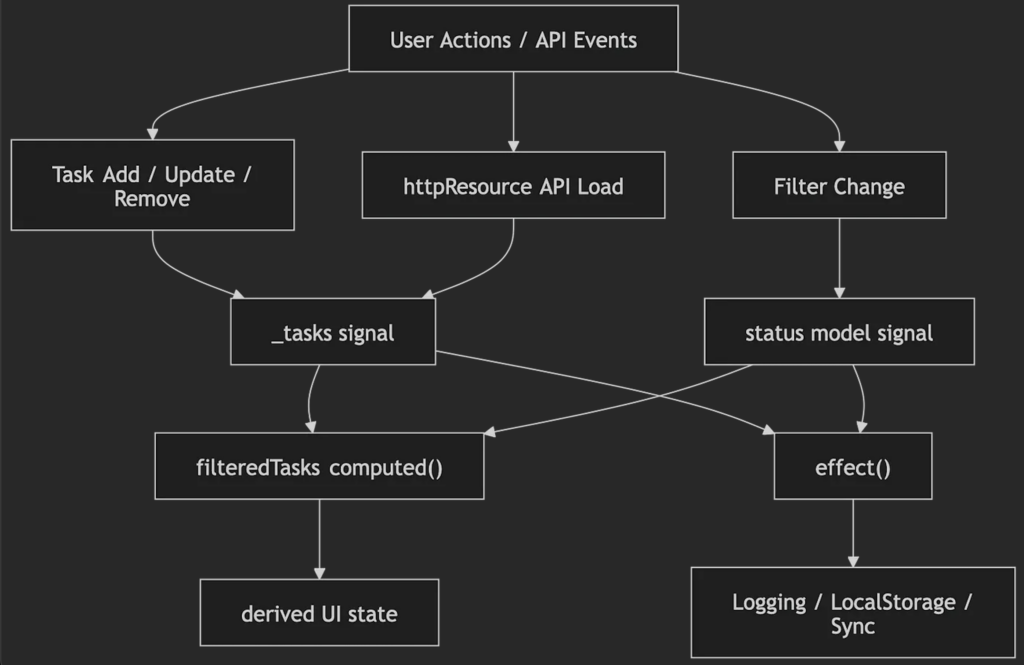
Dataflow in Task app
4. Project Structure
src/
└─ app/
├─ components/
│ ├─ task/
│ └─ task-filter/
├─ models/
│ └─ task.model.ts
├─ pages/
│ └─ task-list/
└─ services/
└─ task-store.service.ts
This separation keeps:
- UI
- Domain models
- Application state
cleanly isolated.
5. Creating a Signal Store
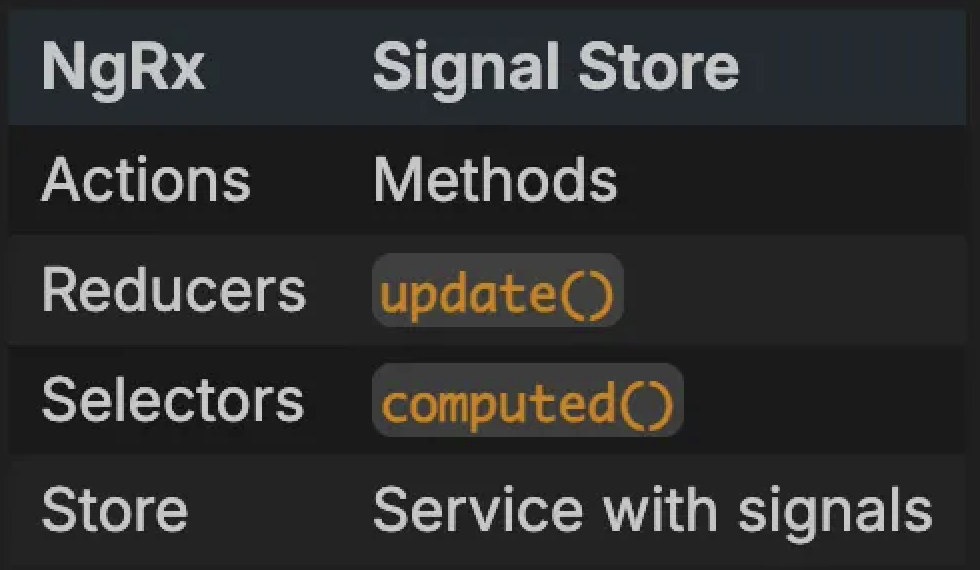
Similar to a centralized application store such as NgRx Store, our service becomes the single source of truth for application state. Instead of dispatching actions and writing reducers, we directly expose methods that update Signals. Components don’t mutate state themselves – they simply call these methods, keeping state updates predictable and centralized.
@Injectable({
providedIn: ‘root’
})
export class TaskService {
private _tasks = signal<Task[]>([]);
tasks = this._tasks.asReadonly();
addTask(task: Task) {
this._tasks.update(tasks => […tasks, task]);
}
setTasks(tasks: Task[]) {
this._tasks.set(tasks);
}
removeTask(task: Task) {
this._tasks.update(tasks =>
tasks.filter(t => t.id !== task.id)
);
}
updateTask(updated: Task) {
this._tasks.update(tasks =>
tasks.map(t => t.id === updated.id ? updated : t)
);
}
}
6. Signal Inputs Instead of @Input
Unlike the traditional @Input() decorator, input() creates a Signal that participates in Angular’s reactive graph. Whenever the parent updates the input value, Angular automatically refreshes only the components consuming that signal. This removes much of the boilerplate associated with input change detection while making component communication more reactive.
export class TaskComponent {
task = input<Task>();
}
Template:
@if (task(); as t) {
<h3>{{ t.title }}</h3>
}
Calling task() makes the template a reactive consumer. If the parent changes the task, only this component updates.
7. Two-Way Binding with model()
The model() API simplifies two-way binding by combining the responsibilities of @Input() and @Output() into a single reactive primitive. This makes parent-child communication much easier to understand and reducing the need for EventEmitter boilerplate.
export class TaskFilter {
status = model<TaskStatus | ‘all’>(‘all’);
}
<app-task-filter [(status)]=”status”></app-task-filter>
This replaces:
- @Input
- @Output
- EventEmitter
with a single reactive primitive. If the child updates the status, the parent value is automatically synchronized.
8. Derived State with computed()
One of the biggest advantages of Signals is the ability to create derived state. Instead of storing duplicate copies of filtered data, we compute it from existing state. Angular automatically tracks every Signal accessed inside computed(). Whenever one of those dependencies changes, Angular recalculates the value and updates only the consumers that depend on it.
filteredTasks = computed(() => {
return this.status() === ‘all’
? this.tasks()
: this.tasks().filter(
t => t.status === this.status()
);
});
What computed() does:
- Creates derived state
- Automatically tracks dependencies
- Memoizes results
- Recalculates only when dependencies change
- Has no side-effects
Think of it as: NgRx Selector + Memoization + Automatic Dependency Tracking
This builds a dependency graph:
- Depends on tasks
- Depends on status
Only the affected UI updates. This approach ensures that the filtered list always stays synchronized with the source task collection, without requiring manual updates or additional subscriptions. It makes derived state predictable and easy to maintain.
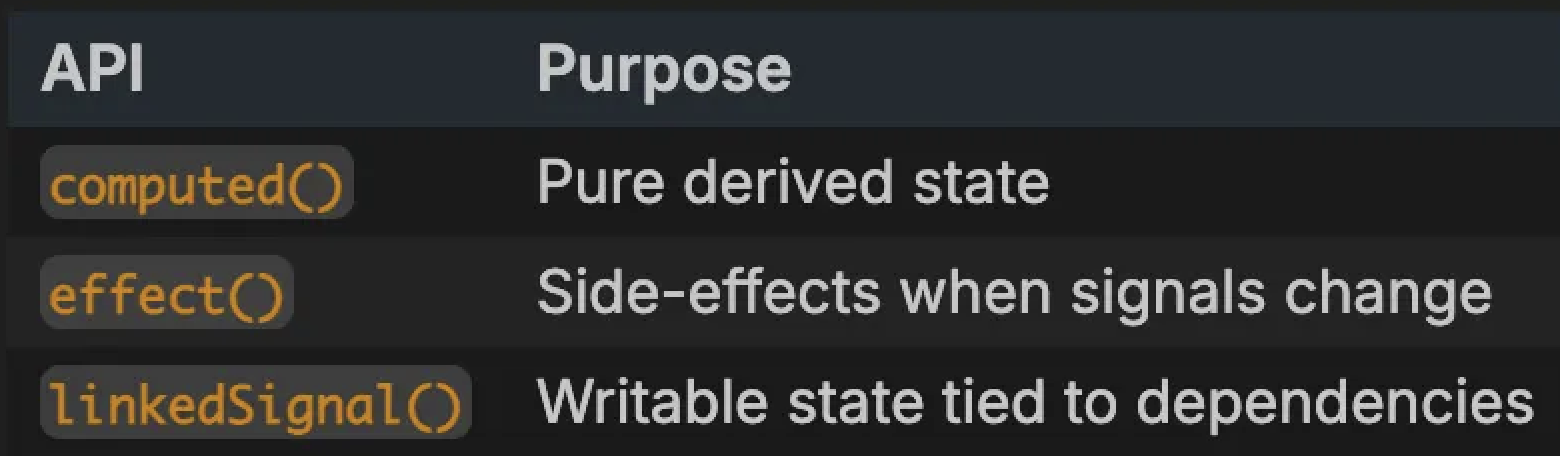
9. linkedSignal() vs computed() vs effect()
Angular provides three reactive patterns:
effect() — When and Why to Use It
Unlike computed(), which returns derived values, effect() is intended for operations that interact with the outside world. Since effects execute whenever one of their tracked dependencies changes, they should never be used to calculate application state.
Use effect() for:
- Logging
- Analytics
- LocalStorage sync
- API synchronization
- External systems
effect(() => {
localStorage.setItem(‘tasks’, JSON.stringify(this.tasks()));
});
The effect tracks the tasks signal. Whenever the task list changes, the effect runs again and synchronizes the latest state with localStorage. This is a side effect because it interacts with an external system rather than deriving new application state.
Important:Avoid using effect() for derived state.
Risk:Improper use can create effect loops:
effect(() => {
this.tasks.set([…]); // Can unintentionally retrigger
});
Rule: Use computed() for state derivation, effect() for side-effects.
Example: linkedSignal()
While computed() creates read-only derived values, linkedSignal() creates writable state that automatically resets whenever its source dependency changes.
subjects = signal([‘Math’, ‘Science’]);
selected = linkedSignal(() => subjects()[0]);
If subjects changes: selected resets. If the user updates selected: It remains until the dependency changes again. This avoids:
- Manual synchronization
- Effect loops
10. untracked()
Normally, every Signal read inside an effect() becomes part of its dependency graph. Sometimes, however we only need the current value of a Signal without subscribing to future updates. untracked() allows us to temporarily opt out of dependency tracking.
effect(() => {
console.log(untracked(this.tasks));
});
Use cases:
- Logging snapshots
- Debugging
- Reading values without reactive coupling
11. Loading Data with httpResource
Managing loading, success, and error states is one of the most common patterns in Angular applications. httpResource() provides a Signal-based abstraction that exposes all of these states reactively, making asynchronous data fetching feel consistent with the rest of the Signal ecosystem.
taskResource = httpResource<Task[]>(() => ‘/api/tasks’);
constructor() {
effect(() => {
if (this.taskResource.hasValue()) {
this.setTasks(this.taskResource.value()!);
}
});
}
httpResource exposes:
- value()
- isLoading()
- error()
All are provided as signals.
12. Signals and RxJS Together
Signals do not replace RxJS in every scenario.
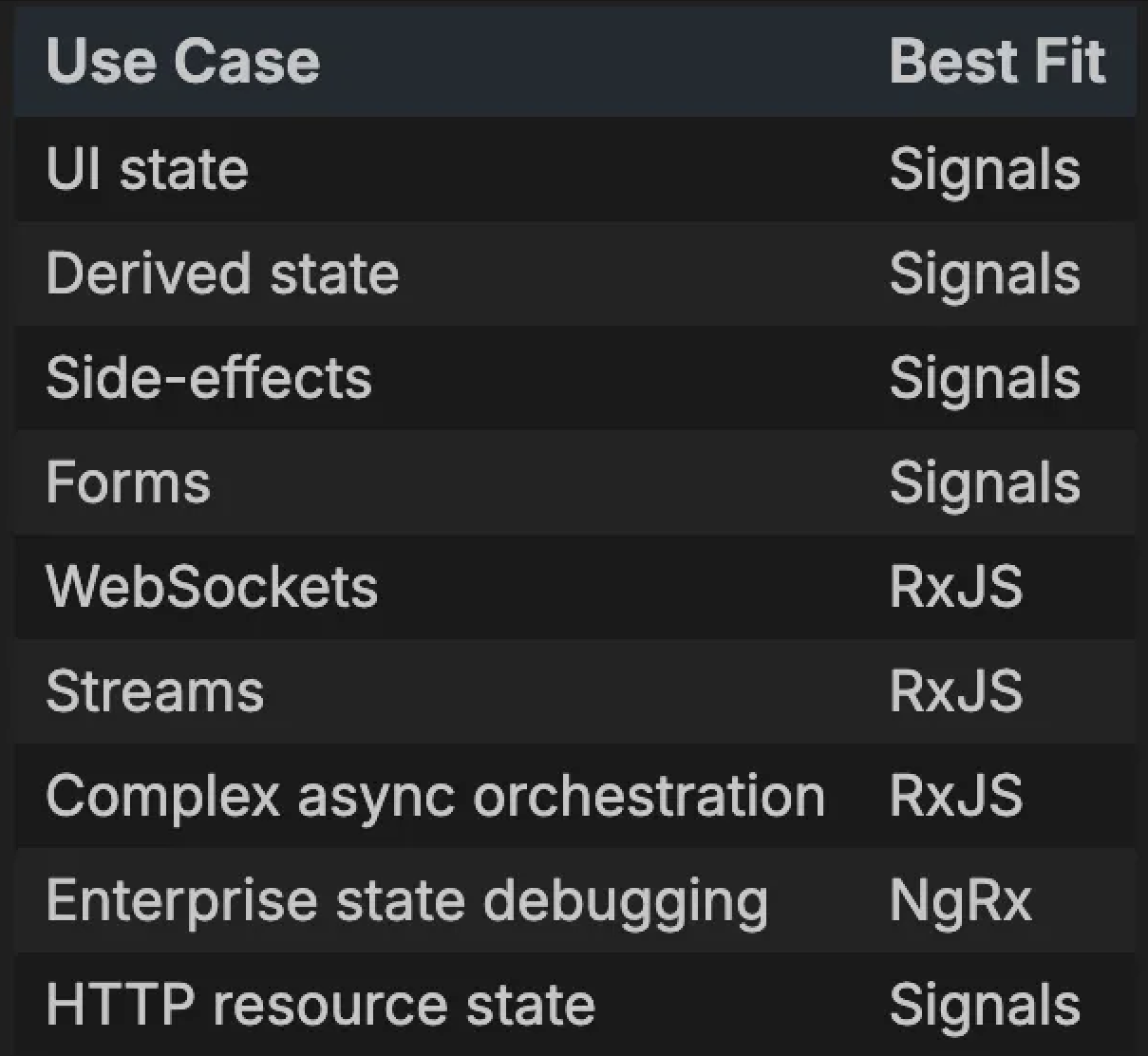
Angular’s rxjs-interop package allows Signals and RxJS to work seamlessly together.
Best Practice:
- Use Signals for UI-centric state
- Use RxJS for async-heavy workflows
- Use NgRx for enterprise-level complexity
13. When Signals are the Best Fit
Signals provide the greatest benefit in applications where UI responsiveness and state synchronization are the primary concerns. Dashboards, forms, settings pages, and management portals typically contain large amounts of shared state that can be modeled more simply with Signals than with traditional observable-based approaches.
- Shared UI state
- Medium-scale applications
- Component communication
- Fine-grained rendering
14. Why this Architecture Works
This approach provides you with:
- Global store
- Derived state
- Async loading
- Fine-grained UI updates
- No NgRx boilerplate
- Reduced Zone.js overhead
For many applications, this delivers an NgRx-like structure with significantly less boilerplate.
15. When Signals May Not Be Enough
Consider RxJS or NgRx when you need:
- WebSockets
- Event streams
- Complex cancellations
- Time-travel debugging
- Large enterprise architecture
- Advanced middleware
While Signals significantly reduce boilerplate, they are not intended to replace every reactive programming pattern. Applications that involve continuous event streams, advanced asynchronous workflows, or enterprise-scale state management may still benefit from RxJS or NgRx. Choosing the right tool depends on the complexity of the problem, rather than adopting a single solution for every situation.
16. Final Thought
Signals are not just a feature, they represent Angular’s new programming model. If you design around the following principles:
- Signal stores
- Computed state
- Effects
- Linked state
- Resource APIs
you will build Angular apps the way they will be written for the next decade. Rather than replacing RxJS or NgRx entirely, Signals provide a simpler and more intuitive foundation for managing application state in modern Angular applications.
References
Angular Signals (Official Documentation)
https://angular.dev/guide/signals
